
Ganvent Create an online store
Ganvent SACShopping
4.737.00 Reviews
- Version
- 45.0
- Installs
- 100.00K
- Age Rating
- Everyone
Screenshots

Our Review of Ganvent Create an online store
 Analysis by Appyee
When I’m choosing a phone-based tool for selling online, I first ask what I need to handle myself: product presentation, daily stock changes, and the routine of keeping orders moving. Ganvent is aimed at people who want to build and manage a shop from a mobile app rather than begin with a complicated web setup. I’d treat it as a practical starting point for a small business, not assume that an easy launch automatically solves the harder work of running one.
The app is free to install and is developed by Ganvent SAC. It has a 4.7 average from around 1,600 ratings, and over 50,000 installs. Those figures suggest that it has found an audience, though I’d still judge it by whether its workflow suits your products and how you plan to sell. It is rated for Everyone, runs on Android 6.0 or later, and its current version is 41.0.
Start with the work you actually need to do
Before building a storefront, I’d make a simple list of the tasks I expect to repeat: adding an item, correcting its details, checking stock, and responding when an order arrives. A shop-building app is most useful when those everyday jobs are manageable on a phone, not just when the first screen looks polished. Ganvent’s focus on store creation and inventory makes it relevant to sellers who want those pieces together.
It may suit a maker with a small range of products, a side business testing demand, or a shop owner who wants to keep an eye on operations while away from a desk. It is less compelling if your main need is a large, highly customized commerce operation with specialist workflows. In that situation, I’d compare dedicated web-based commerce platforms and check their specific tools before moving a whole business.
What the mobile-first approach changes
Working from a phone can be a genuine advantage when an item sells at a market or a product detail needs correcting between other jobs. It can also encourage quick edits that are easy to overlook. I’d use a repeatable product-entry routine: prepare the title, description, images, and stock count together, then review the finished listing before sharing it. That small pause helps keep a shop consistent when updates happen in short bursts.
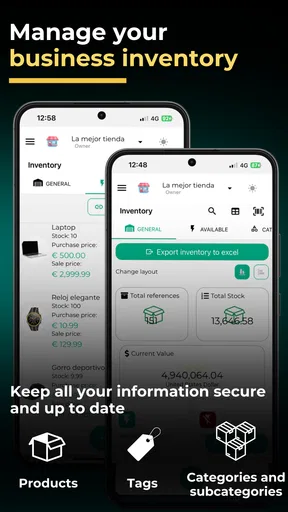
For inventory, the useful question is not simply whether a dashboard exists, but whether you can make it part of your day. I’d check stock after a sale and again before promoting a popular item, especially if I also sell in person. If the same products are listed in multiple places, a change in one place may not automatically reflect everywhere; sellers should verify their own workflow rather than assume every channel stays synchronized.
For someone deciding whether to start, the app’s free download lowers the initial barrier, but the listed in-app purchases range from $2.49 to $149.99 per item. I’d explore what is available in the app and identify which tools are essential before committing money. That matters most for a new seller whose margins are thin: a feature can be useful and still be poor value if it does not save enough time or help serve customers.
Simplified Store Setup
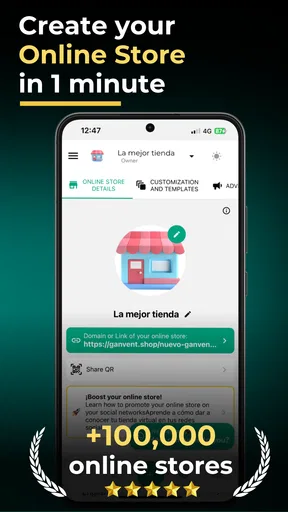
First things first, the setup process with Ganvent is a breeze. You’re not going to need a computer science degree to get this thing up and running, trust me. Once you download the app, you’re guided through a step-by-step setup. You can choose from a variety of sleek templates that make your store look professional from the get-go.
What I found particularly cool is the drag-and-drop feature. Adding products, images, and descriptions is a cinch. It kind of feels like playing with digital building blocks, and before you know it, you have a store ready to roll.
Customization Galore
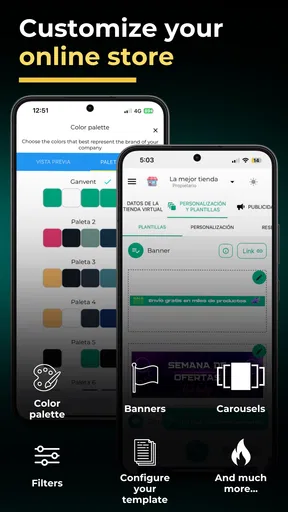
One of the standout features of Ganvent is its flexibility when it comes to customization. Whether you’re selling handmade crafts or digital downloads, you can tweak the look and feel of your store to match your brand’s vibe. I spent a good hour just playing around with color schemes and fonts, and honestly, it was fun!
But it’s not just about aesthetics. The app allows you to configure payment methods, manage shipping options, and even set up promotional codes to attract customers. That's pretty nifty if you ask me.
Managing Your Store
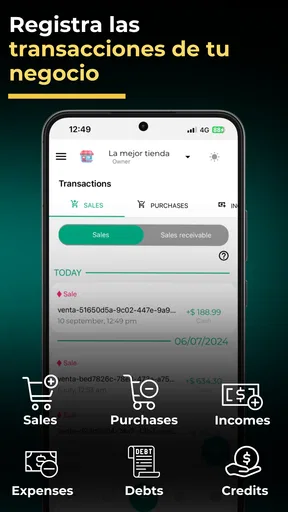
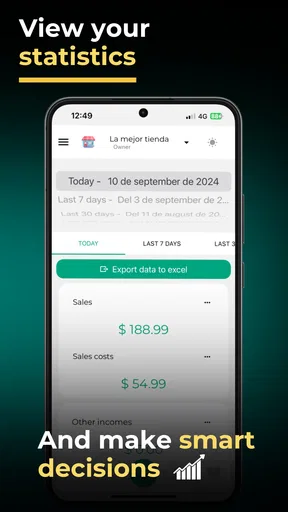
Once your store is live, Ganvent makes management super straightforward. From tracking inventory to monitoring sales, everything is accessible from a neat dashboard. You can even get notifications for new orders, which is a nice touch for staying on top of your business.
“The ability to manage everything from my phone is a game-changer.”
Plus, if you ever hit a snag, their customer support is just a click away. I had a minor hiccup with setting up my payment gateway, and their team was quick to help out.
Built-In Marketing Tools
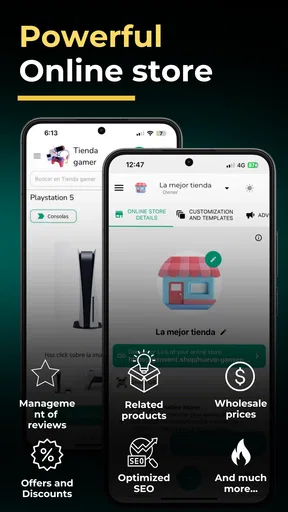
Now, you can have the best store in the world, but if nobody knows about it, what’s the point, right? Ganvent comes with built-in marketing tools to help you spread the word. From SEO optimization to social media integration, they’ve covered all bases.
I particularly liked the email marketing feature. You can create and send newsletters to your customers directly from the app. It’s super handy for keeping your audience engaged and informed about new products or sales.
Integrations and Extensions
If you’re into tech and love your apps talking to each other, Ganvent has you covered. It integrates seamlessly with various third-party apps and services, including popular ones like Google Analytics and Mailchimp. This makes expanding your store’s functionality a lot easier.
For the developers out there, the app offers API access, allowing you to build custom solutions if that’s your thing. But even if you’re not a tech wizard, the existing integrations are more than sufficient to power up your store.
A Few Considerations
Okay, I’ve sung a lot of praises, but let’s talk about a couple of things you might want to consider. While Ganvent is feature-rich, it can feel a bit overwhelming if you’re brand new to e-commerce. I’d recommend spending some time with the tutorials they provide to get the hang of things.
Also, while the app is free to download, some features require a subscription. It’s not a huge deal, but something to keep in mind as you plan your budget.
Making the choice without rushing a migration
If you already sell through social media messages, a marketplace, or a basic website, the main question is whether Ganvent would reduce the awkward handoffs between product updates, stock checks, and customer orders. A marketplace can bring shoppers who are already browsing, while a standalone store gives you a place to present your own range. Those are different strengths, so I wouldn’t switch simply because creating a storefront sounds appealing.
A low-risk way to evaluate it is to begin with a small, representative set of products rather than moving everything at once. Include an item with options or a more involved description if those are typical for your business. Then walk through the customer-facing experience and your own routine for changing details. This reveals practical friction—such as how comfortable it feels to edit listings on a phone—before the app becomes part of your whole operation.
A realistic routine for a small seller
Imagine I make candles and have a weekend market coming up. Before leaving, I could check which scents are ready, make sure their listings describe them clearly, and confirm the stock I intend to offer online. After a market sale, I’d update the relevant quantity before promoting that scent again. The value here is not a magic sales boost; it is having store tasks close at hand so I’m less likely to postpone a small but important correction.
I’d also separate preparation from promotion. First make sure the product page is accurate, images match the item, and the available quantity is realistic. Then use a promotional message or newsletter only when there is something useful to tell customers, such as a restock or a genuinely relevant offer. Sending updates too often can create noise, and marketing tools are only helpful when the underlying information is dependable.
Questions worth settling before you rely on it
Can I run a shop entirely from my phone? The app is designed around mobile store creation and management, so it can be a sensible choice if phone-based work is comfortable for you. I’d still test longer tasks—writing many product descriptions or reviewing a large catalog—before deciding that a phone is enough for every part of the job. Some sellers will prefer a computer for focused editing even if they handle quick checks on mobile.
Is it suitable for a first-time seller? I think it can be, especially if you start with a manageable product range and take time to learn the setup rather than trying to configure everything in one sitting. The combination of store-building and business tools can also feel like a lot at first, so I’d launch only after checking the customer view and understanding the steps you’ll repeat after each order.
Will it replace a marketplace or an existing store? I wouldn’t assume so. A marketplace and a standalone storefront serve different roles, and a seller may benefit from using one as a discovery channel while keeping another as the home for a brand. Before moving, check how you will handle product information, customer communication, and stock across all the places you sell. The best choice depends on where your buyers already find you.
Is free installation the whole cost? No: the app is free to install, but in-app purchases are listed from $2.49 to $149.99 per item. I’d review the purchase options and decide what problem each one solves before spending. That is a more useful budget test than buying tools in anticipation of growth that has not yet happened.
Who I’d recommend it to
I’d recommend Ganvent to a small seller who wants to get a shop organized from a phone, values hands-on control over product presentation, and is willing to establish a careful routine for inventory updates. It is particularly appealing when being able to handle a quick listing change or order check away from a desk would make the business easier to run.
I’d look elsewhere if the business depends on complex operations, deep customization, or a selling setup that needs carefully verified connections across multiple channels. In that case, compare the exact workflows offered by other commerce tools and test them with real products before making a decision. A polished launch is not enough; the right platform is the one that remains workable after the first batch of listings.
Overall, Ganvent is a solid choice for anyone looking to launch an online store without a ton of hassle. Its user-friendly interface, combined with robust features, makes it suitable for both beginners and seasoned entrepreneurs. So, are you ready to take your business online? Ganvent just might be the ticket to making that dream a reality.
Verdict
Strengths of Ganvent Create an online store
- User-friendly interface for quick setup.
- Customizable templates suit various brands.
- Integration with popular payment gateways.
- Responsive design for mobile and desktop.,24/7 customer support available.
Limitations of Ganvent Create an online store
- Limited free plan features.
- Advanced tools require premium upgrade.
- Occasional loading delays reported.
- Limited third-party app integrations.
- Customization options can be overwhelming.
Similar Picks in This Category
View All
SHEIN-Shopping Online
Roadget Business PTE. LTD.4.8

Amazon Shopping
Amazon Mobile LLC4.4


Mercado Libre: Compras online
Mercado Libre4.8

Wish: Shop and Save
Wish US Holdings LLC4.7

Alibaba.com - B2B marketplace
Alibaba Mobile4.4
Frequently Asked Questions
What is Ganvent and how does it help in creating an online store?
Ganvent is a versatile platform designed to help users easily create and manage their online stores. It provides a user-friendly interface, customizable templates, and essential e-commerce tools. Whether you're a small business owner or an entrepreneur, Ganvent simplifies the process of launching and maintaining an online store without requiring extensive technical skills.
Is Ganvent suitable for beginners with no technical experience?
Absolutely. Ganvent is tailored for users with little to no technical background. Its intuitive drag-and-drop interface, along with step-by-step guides, makes setting up an online store straightforward. Additionally, Ganvent offers customer support and tutorials to assist newcomers in navigating the platform effectively.
What features does Ganvent offer to enhance my online store?
Ganvent provides a wide range of features, including customizable themes, integrated payment gateways, inventory management, and SEO tools. It also supports mobile optimization, ensuring your store looks great on all devices. These features are designed to enhance user experience and streamline your store’s operations.
Does Ganvent support multiple payment options?
Yes, Ganvent supports a variety of payment gateways, allowing you to offer multiple payment options to your customers. This includes credit card processing, PayPal, and other popular online payment systems. Providing diverse payment options can help increase conversion rates and customer satisfaction.
How does Ganvent handle security and customer data protection?
Ganvent prioritizes security by implementing robust measures to protect customer data. It uses SSL encryption to safeguard transactions and sensitive information. Regular updates and security patches ensure that your online store remains protected against vulnerabilities, giving you and your customers peace of mind.
